Papirofy
How to make an invoice online for free with your logo

If you are a freelancer or run a small business, you need clear, correct invoices. With Papirofy you can make them for free, with your logo and your country's taxes.
Step by step
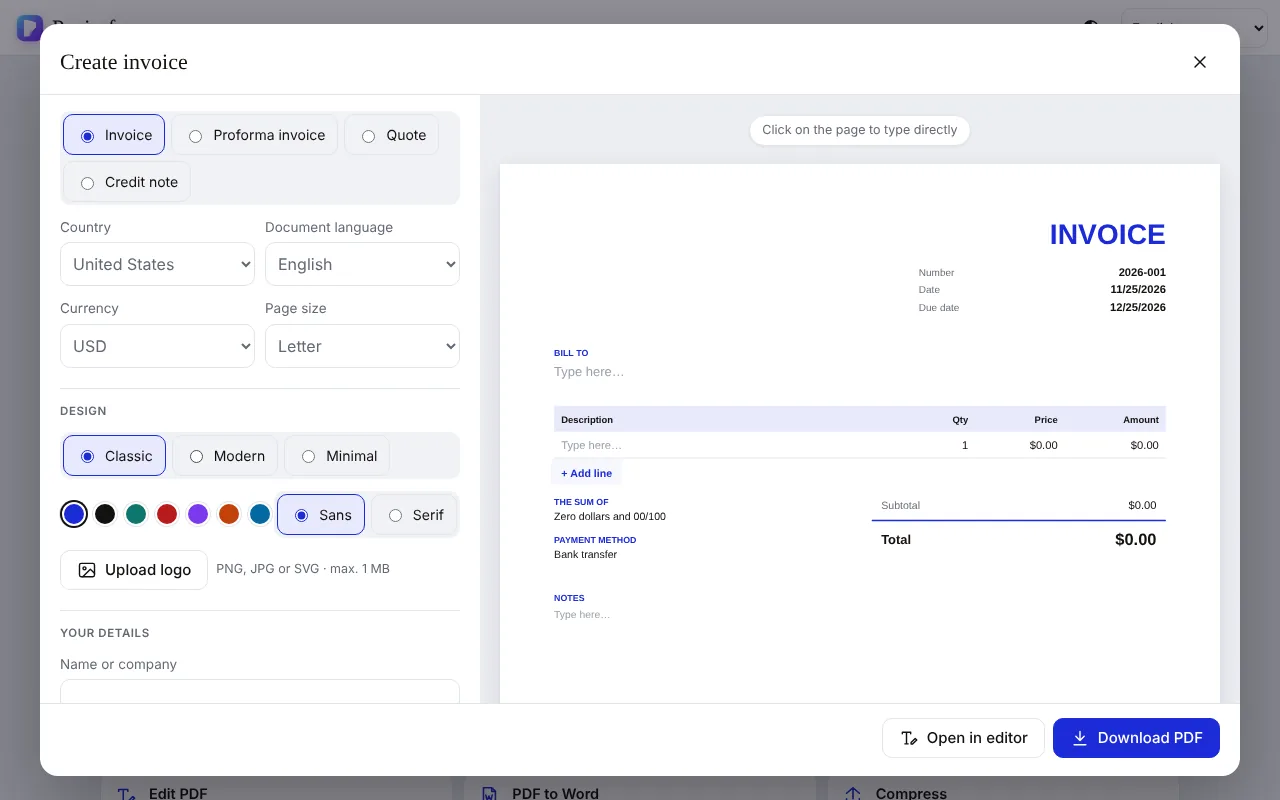
- Open Create invoice. Choose your country: the tax (VAT, GST, sales tax…), usual rates, currency and the name of your tax ID adjust automatically.
- Upload your logo (PNG, JPG or SVG up to 1 MB) and pick one of three templates and your brand color.
- Fill in your details and your client's. You can save clients for next time.
- Type the items right on the page: description, quantity and price. Mark each one as a product or a service. + Add line adds more.
- If it applies to you, choose a withholding and any legal notes you need.
- Press Download PDF. The invoice number moves on automatically for the next one.
What it does for you
- Calculates subtotals, tax per rate, withholdings and the total.
- Remembers your details, logo and clients only on your device, if you choose.
- Writes the amount in words when the language allows it.
Important
In some countries a tax-valid invoice must be issued through an official electronic system (for example, CFDI in Mexico or SdI in Italy). Papirofy tells you when that is the case: then use the PDF as a proforma, a quote or a copy for your client.